
سرجمیں
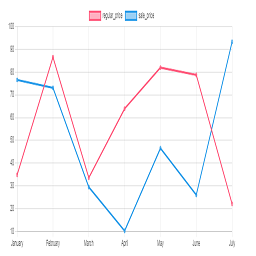
Chart plugin to view price changes of woocommerce product.
- 1-Place the Php code do_shortcode( ‘[chartprice]’ ); in the single page product.
- 2-use shortcode [chartprice] in product post.
- 3-change setting in woocommerce page setting.
Arbitrary section
-
for change format date use php code below in function.php file:
اسکرین شاٹ


انسٹالیشن
This section describes how to install the plugin and get it working.
e.g.
- Upload plugin folder to the /wp-content/plugins/ directory
- Activate the plugin through the ‘Plugins’ menu in WordPress
جُست ءُ پُرس
1-Place the Php code do_shortcode( ‘[chartprice]’ ); in the single page product.
2-use shortcode [chartprice] in product post.
3- for change format date use php code below in function.php file:
    add_filter('chart_price_apply_filter_format_date', 'format_date');

    function format_date($date)

    {

    $date=date('Y/m/d');//defult Y-m-d

    return $date;

    }
جائزہ


کمک کنوک & دیمروئی کنوک
“Plot prices woocommerce product (product price history)” اوپن سورس سافٹ ویئر اِنت۔ اے پلگ ان ءِ تہا رند ءِ مردماں وتی کرد پیلو کتگ۔
کمک کار
“Plot prices woocommerce product (product price history)” ءَ وتی زبان ءَ رجانک کن اِت۔
دیمروئی ءِ تہا دلچسپی داریت؟
کڈ ءَ براؤز کن اِت، SVN ءِ ذخیرہ ءَ بچار اِت، یا دیمروئی ءِ لاگ ءَ RSS ءِ وسیلہ ءَ سبسکرائب بہ کن اِت۔
چینج لاگ
1.0
*head version of plugin
1.1
*chang js file to chart js
2.0
*add the variable product to plot