
Description
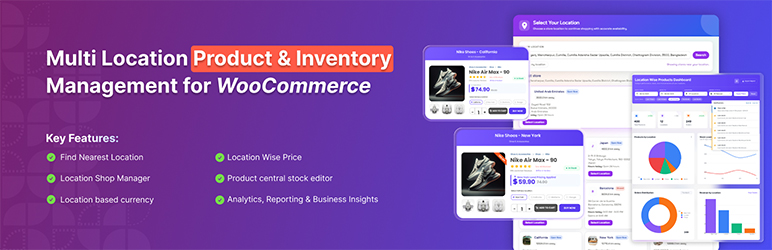
Multi Location Product & Inventory Management for WooCommerce is the ultimate solution for businesses operating multiple physical locations, warehouses, retail stores, pickup points, or regional centers.
This powerful plugin enables you to manage your entire multi-location business from a single WooCommerce installation — providing location-based inventory tracking, pricing, customer selection, and advanced order fulfillment.
Whether you run a chain of retail stores, manage multiple warehouses, operate franchises, or serve different geographical regions — this plugin gives you full control to streamline operations, improve customer experience, and maximize profitability.
» Buy Pro | » More info | » Demos | » Docs
⭐ Key Features at a Glance:
A powerful all-in-one multi-location inventory and store management solution designed to streamline operations, optimize stock control, and deliver a seamless, location-based shopping experience for modern businesses.
✅️ Centralized multi-location inventory Management – Manage stock across unlimited locations with centralized control, per-location quantities, backorders, purchase cost, and stock alerts.
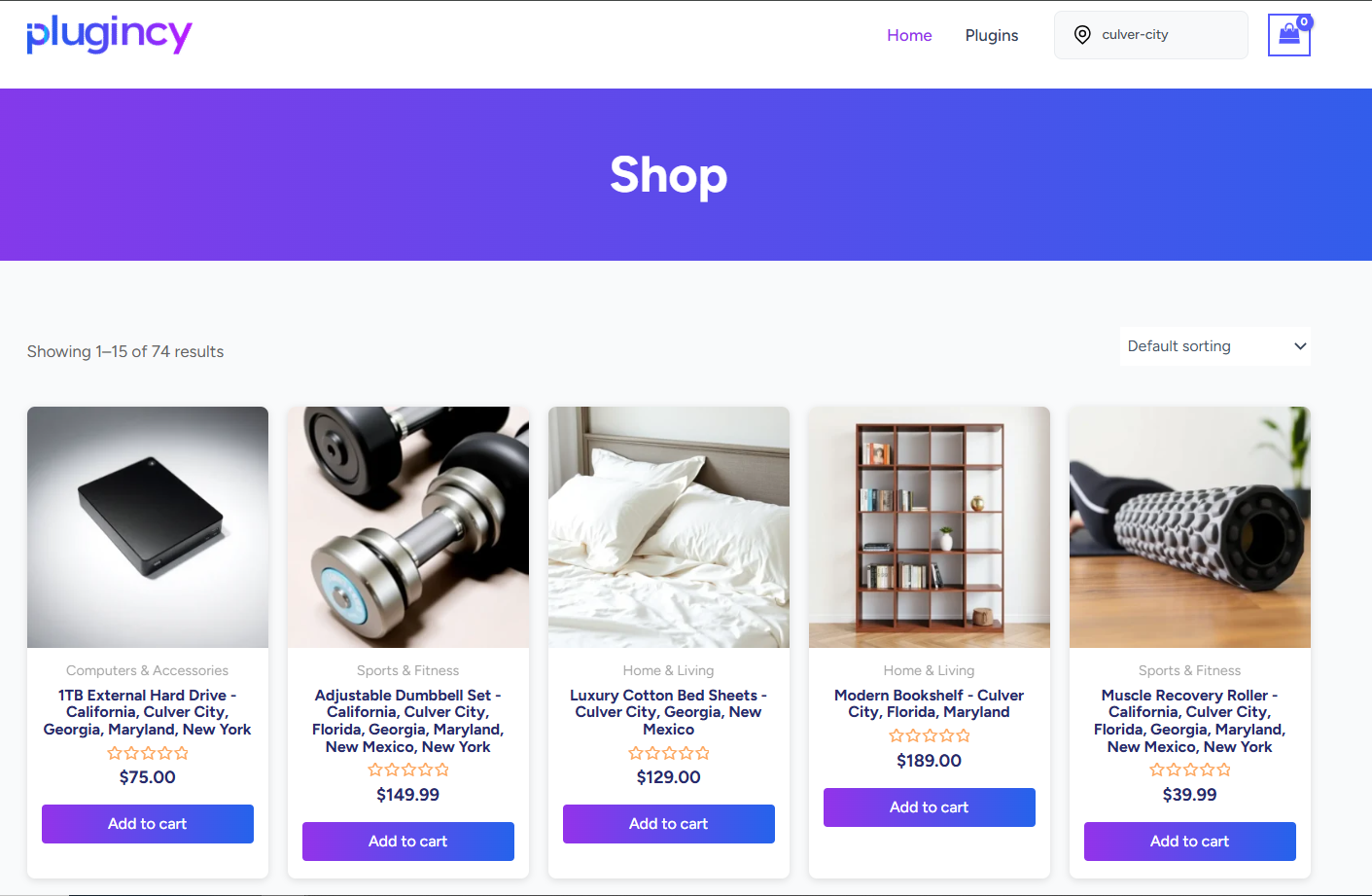
✅️ Location-Based Product Availability & Display – Control which products are visible in each location and ensure customers only see items available in their selected store.
✅️ Location-Based Pricing, Tax & Payment Management – Set different prices, taxes, payment methods, and promotions for each location with full flexibility.
✅️ Multi-currency (Location based currency) – Switch store currency and pricing rules based on the selected location.
✅️ Order Management & Smart Fulfillment by Location – Route, group, split, and manage orders based on location rules for smooth and accurate fulfillment.
✅️ Location-Based Shipping & Local Pickup Management – Configure shipping method restrictions, pickup options, business hours, and cash-on-pickup settings per location.
✅️ Automatic Location Detection & Smart Store Selection – Use browser/IP location tools and OpenStreetMap/Nominatim based location matching, or allow customers to manually select their preferred location.
✅️ Analytics, Reporting & Business Insights – Track revenue, profit, stock, investment, and performance per location with advanced reports and dashboard visualizations for quick decision-making.
✅️ Store Operations & Team Management – Assign location managers, manage roles, and control operations at each branch independently.
✅️ Communication & Real-Time Notification System – Get instant stock alerts, order notifications, social notifications, and real-time dashboard synchronization across devices.
✅️ Integration, Sync & Data Management – Import & Export data via CSV/ZIP workflows, connect REST APIs, receive webhooks, and sync inventory with external WMS/POS/ERP systems.
✅️ SEO, Marketing & Store Discovery Tools – Improve visibility with location-based SEO pages, promotions, reviews, and an interactive store locator.
✅️ Real-Time Stock Display & Dynamic Frontend Experience – Display live stock quantities, enable location-based filters, and provide a smooth, location-aware shopping experience.
🏢 CORE LOCATION & INVENTORY FEATURES
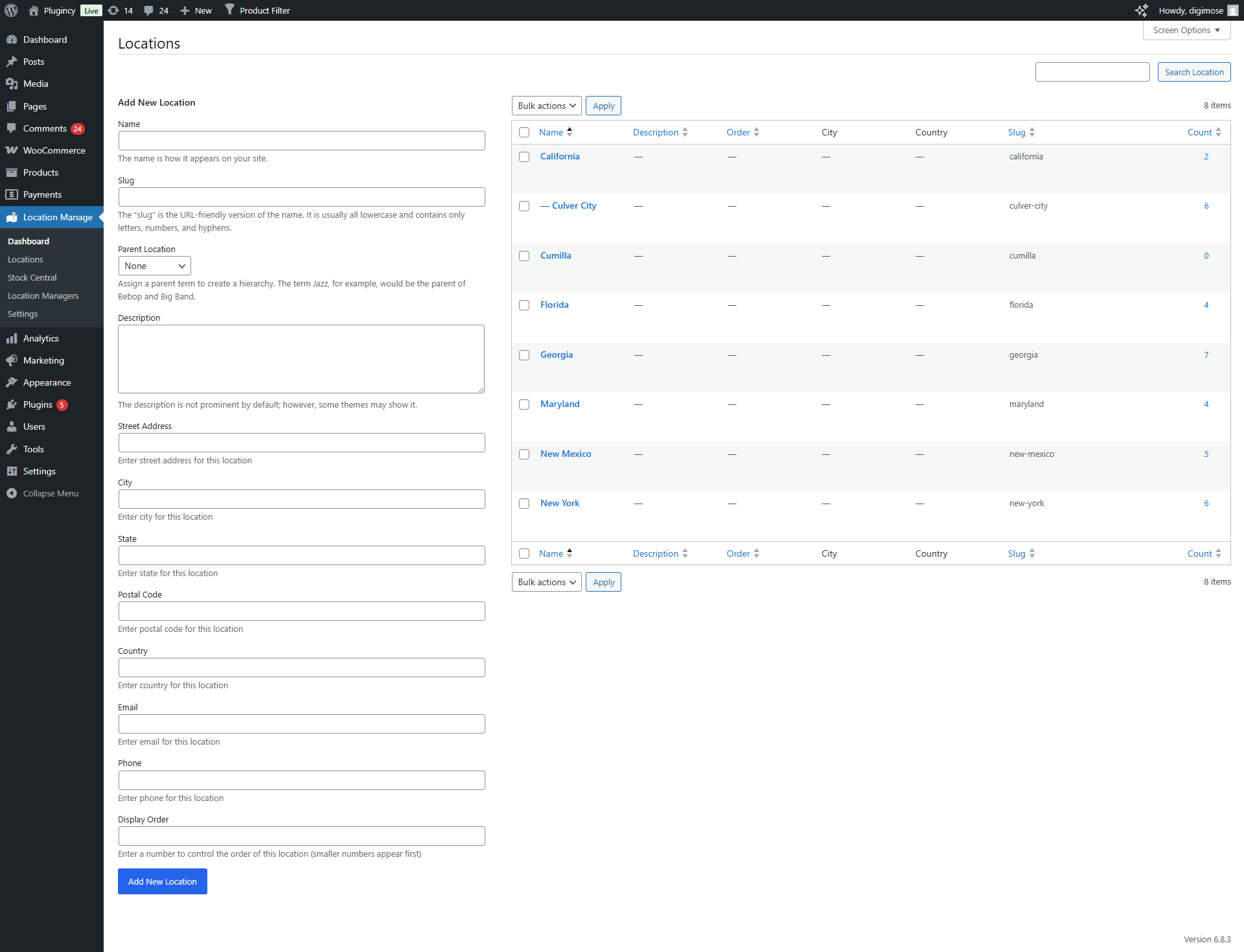
📍 Unlimited Location Management
- Create and manage unlimited locations.
- Add detailed business info including address, contact, map coordinates, logo, gallery, and business hours.
- Parent-child (hierarchical) location structure.
- Enable or disable locations as needed.
- Set display order and location aliases.
- Assign products to one or multiple locations.
- Bulk assign or remove locations for multiple products.
📦 Location-Based Inventory Tracking
- Manage all stock from one centralized dashboard.
- Filter products by location to check stock availability.
- Set separate stock quantities per location.
- Define regular, sale, and purchase prices per location.
- Manage stock statuses including in stock, out of stock, and backorder.
- Low stock and stock performance tracking per location.
- Purchase price and profit margin tracking.
- Toggle product activation/deactivation per location.
- Manage simple products and variations.
🎨 Frontend Display Options
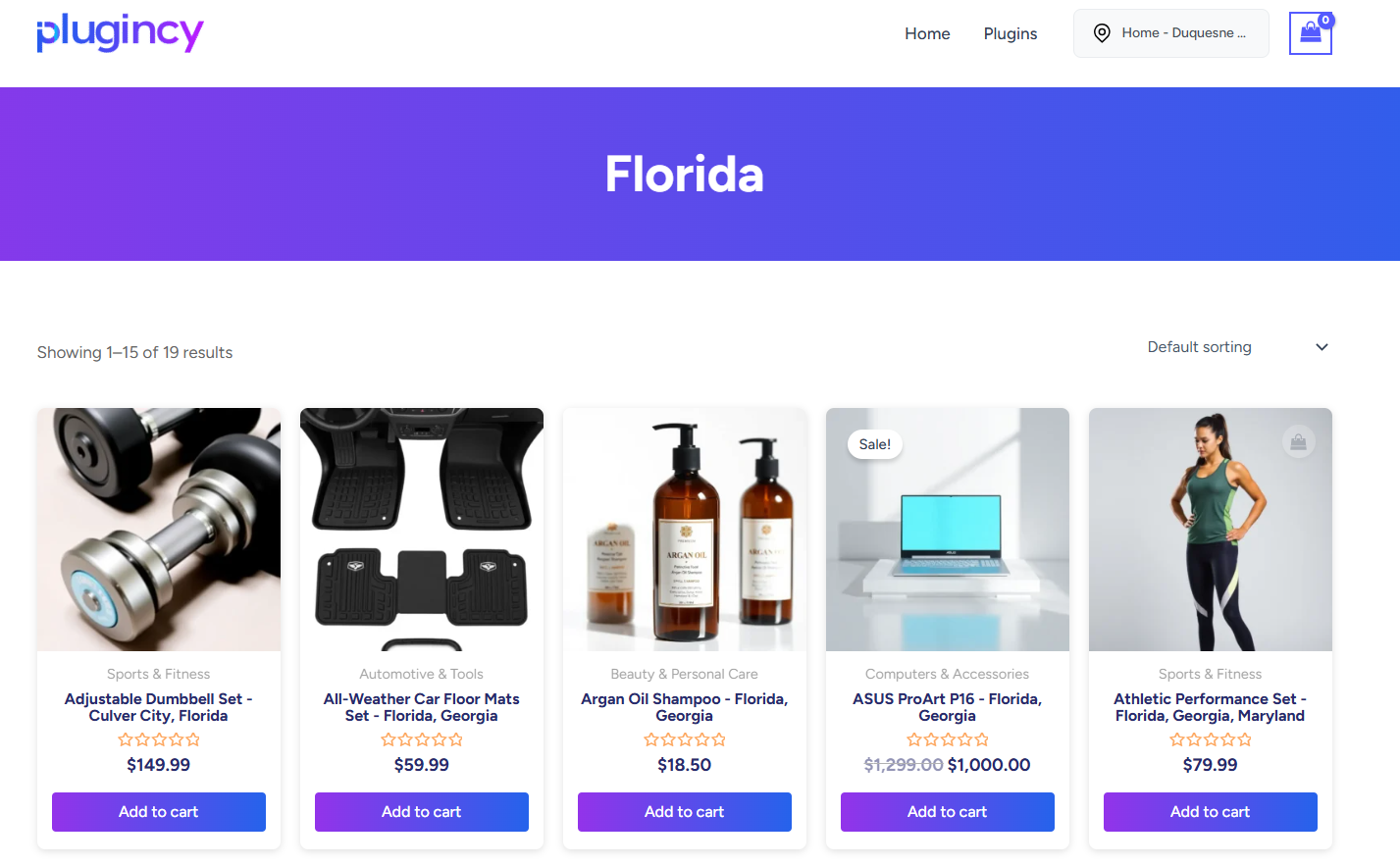
- Show location names on product titles.
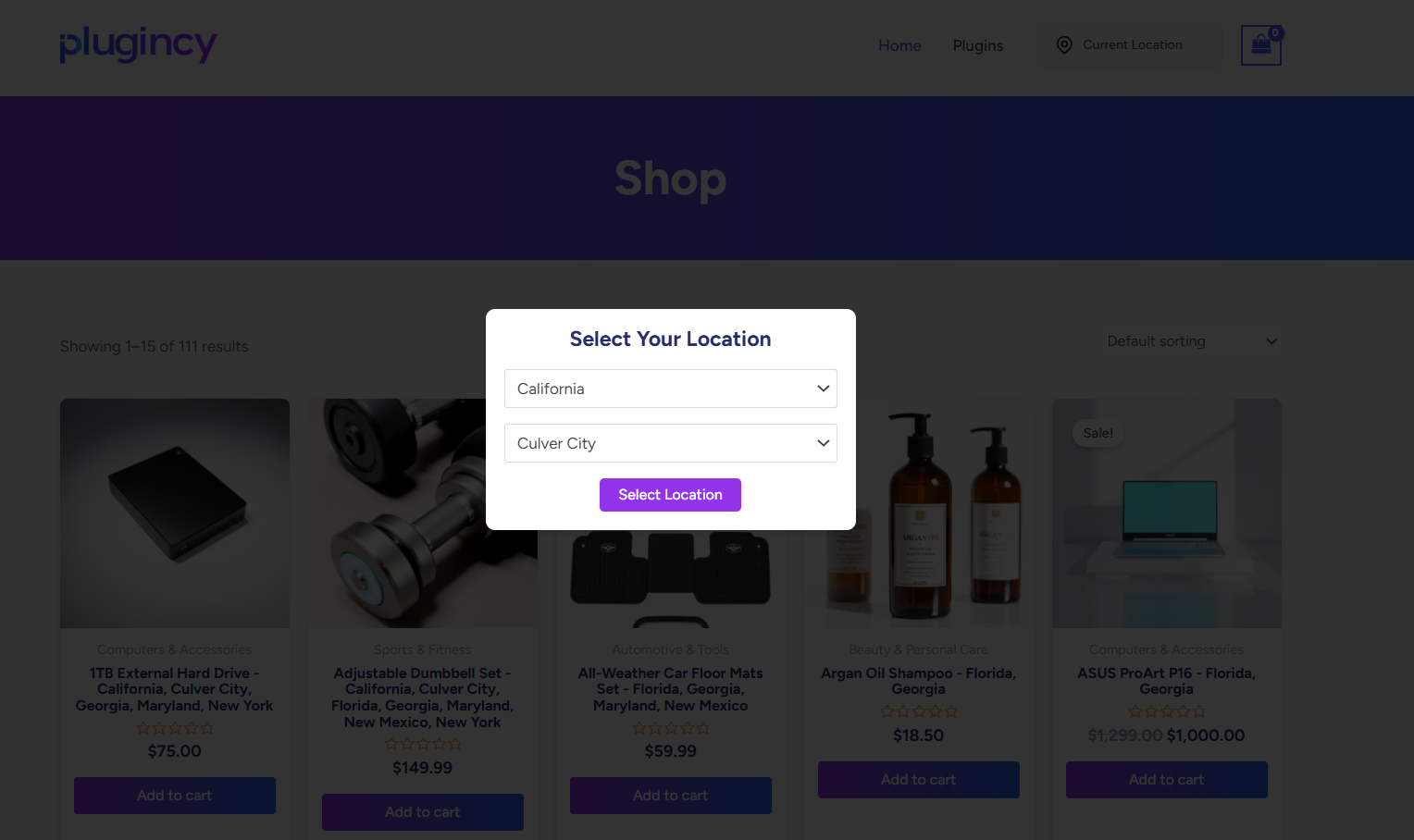
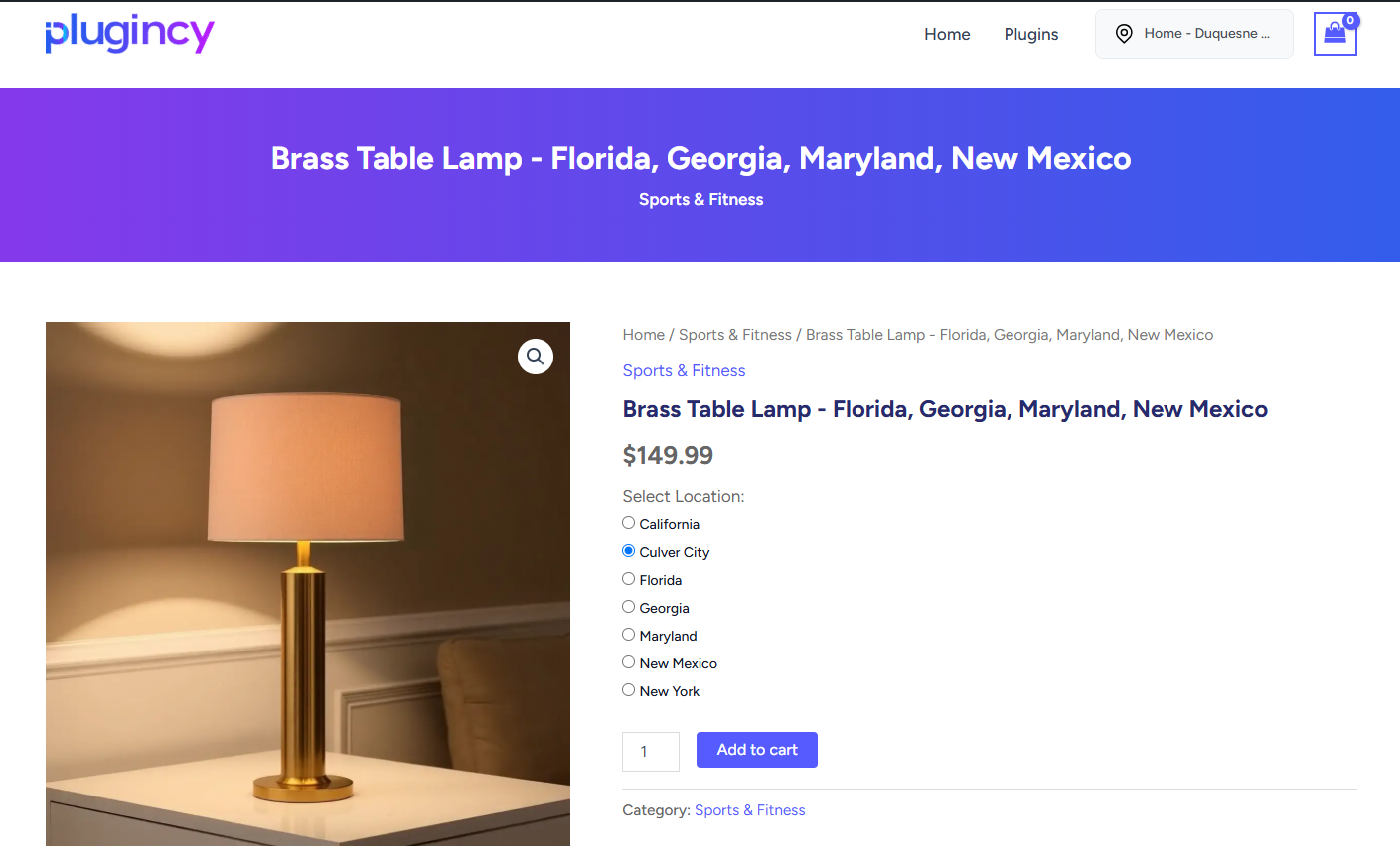
- Display location selectors in dropdown, list, button, popup, or modal style.
- Responsive and customizable display layout.
- Show or hide location info on shop, archive, and single product pages.
- Display location-specific stock messages.
- Product filter UI for location and stock filtering when enabled.
- Native location archive pages plus shortcode-based custom archive layouts.
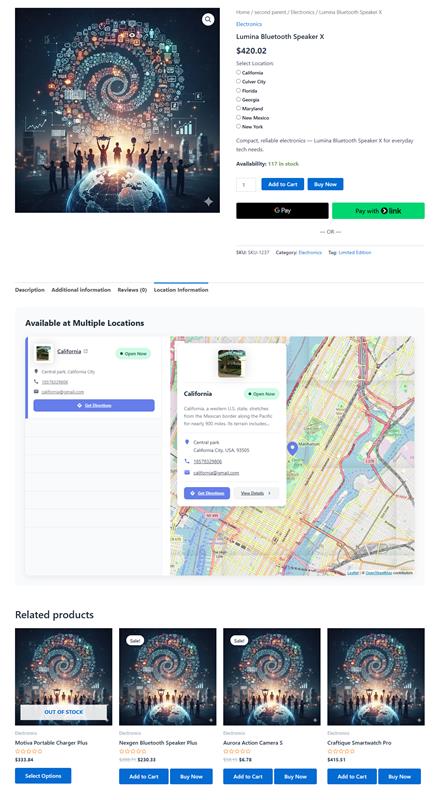
- Single-product location information tab/sections and product-level location selector support.
- Shortcode:
[mulopimfwc_store_location_selector]for placement anywhere.
🛒 Customer Location Selection
- Customers can choose their preferred store location.
- Location persistence using cookies.
- Automatic product filtering by selected location.
- Optional cart update when changing locations.
- Control display of out-of-stock products using hide, badge, or gray-out behavior.
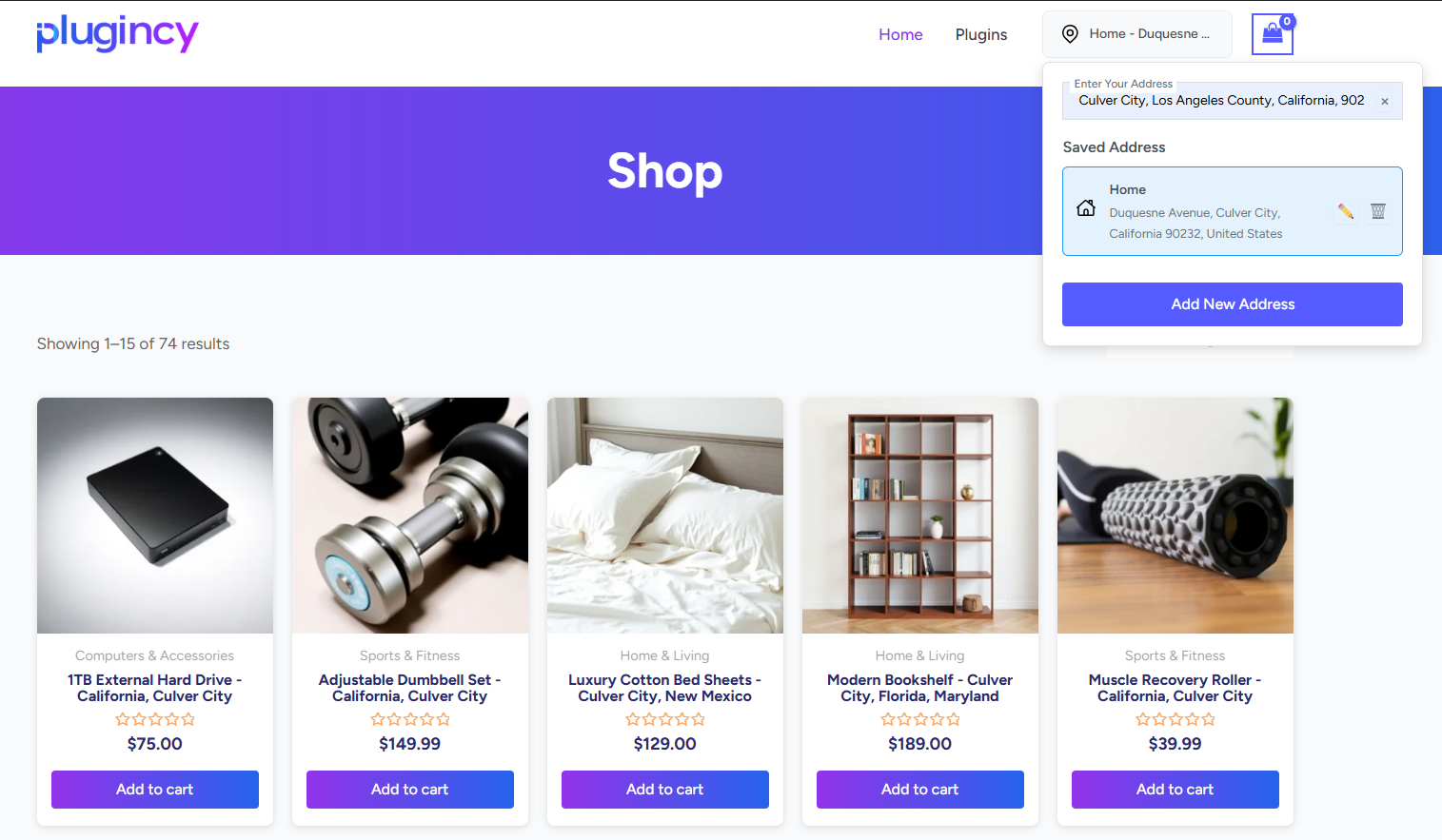
- Customer address and location selection helpers.
- Manual/inventory-based assignment modes can suppress frontend selectors when strict mode is enabled.
📋 Order Management & Fulfillment
- Orders automatically tagged with the customer-selected location.
- View, filter, and manage orders by location in admin.
- Quick assign and bulk assign order locations.
- Order count indicators per location.
- Cart item location selection when enabled.
- Mixed-location cart support when compatible with settings.
- Cart grouping by location.
- Split orders by location when compatible with mixed-cart settings.
- Inter-location transfer cost display and order metadata.
- HPOS-aware order queries and order-list support.
⚙️ Admin Dashboard & Settings
- Centralized admin interface under Location Manage.
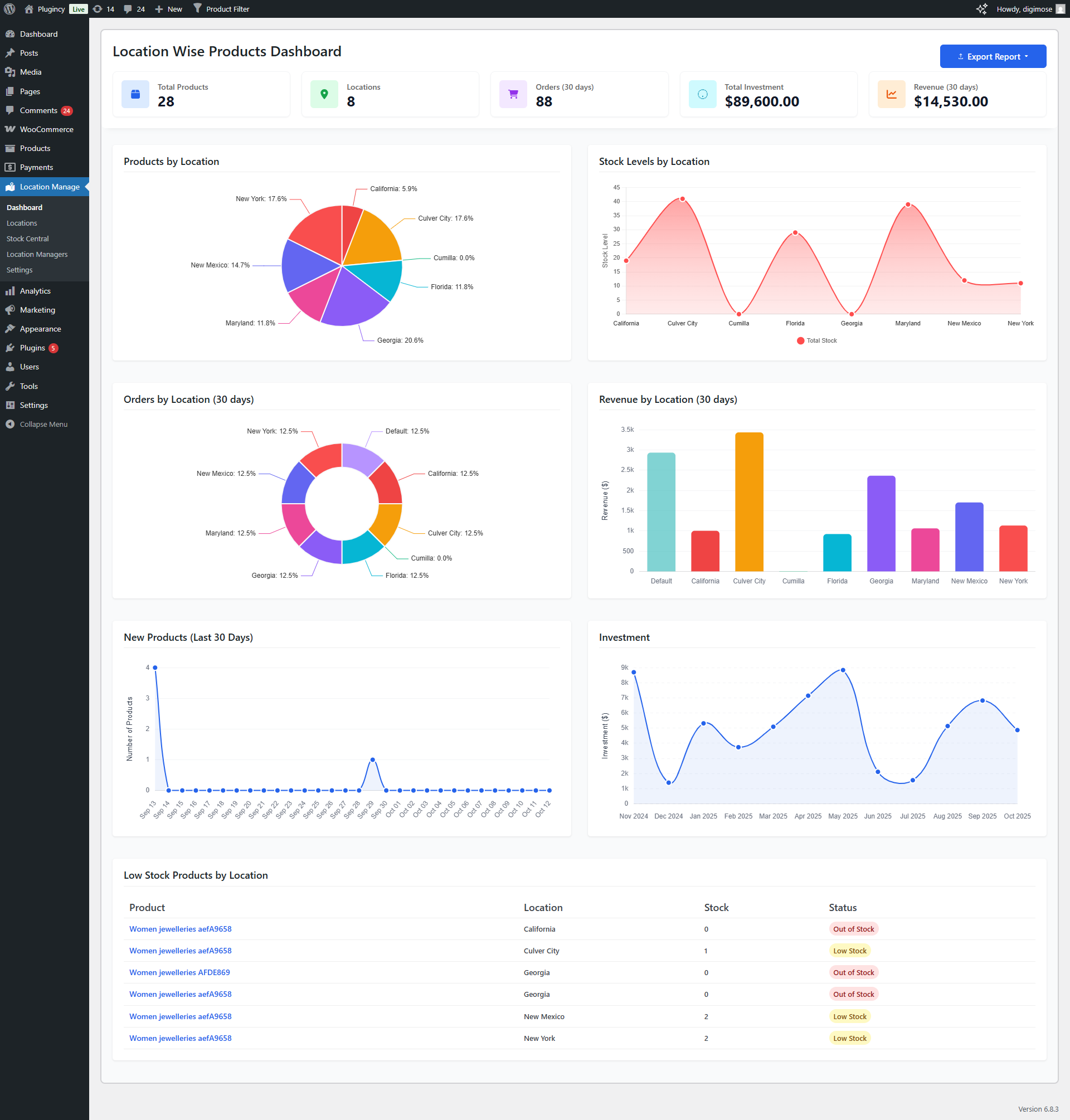
- Dashboard reports for orders, revenue, stock, investment, profit, and low-stock data.
- Product location overview table.
- Stock Central modern and classic row editors.
- Location Managers screen with assigned locations and permissions.
- Addons screen.
- Settings tabs for General, Inventory, Product Visibility, Popup, Order & Cart, Notifications, Location Wise Everything, User Experience, Location Info Management, Text Management, Advanced, and Plugin License.
- Text Management tools for frontend/admin wording, translation defaults, reset, and apply actions.
- Custom CSS controls for popup and display styling.
- Settings reset and Text Management reset tools.
- Plugin settings backup/import/export.
- Compatible with WooCommerce HPOS and REST API.
- Secure AJAX operations, data sanitization, and performance caching.
🚀 ADVANCED PRO FEATURES
🌍 Geolocation & Auto Detection
- Detect customer location using browser/IP location tools.
- Resolve nearest or matching locations using address, coordinates, aliases, and OpenStreetMap/Nominatim data.
- Display available inventory for the selected or resolved location.
- Location-based recommendations.
- OpenStreetMap/Leaflet based map display.
📍 Location-Based Shipping & Logistics
- Configure shipping method availability by store location.
- Set location-specific shipping zones and method restrictions.
- Bulk assign WooCommerce shipping methods to locations from the shipping-zone tools.
- Show location information in WooCommerce shipping-zone method tables.
- Calculate inter-location transfer costs for inventory movement.
- Refresh shipping choices when customers change location.
- Support location-specific pickup filtering.
- Works with existing WooCommerce shipping methods rather than a named carrier connector.
🧾 Location-Based Tax & Payment Management
- Configure tax class behavior by location.
- Apply tax behavior based on selected store location.
- Enable or disable payment gateways depending on location.
- Apply location-specific payment restrictions and rules.
- Includes cash-on-pickup payment gateway support.
- Includes Checkout Blocks payment integration for cash on pickup.
🎯 Location-Specific Promotions
- Create location-aware coupon and discount restrictions.
- Apply coupon validation based on selected location.
- Restrict coupons by products and cart items tied to locations.
- Adjust coupon amounts and thresholds for location-wise currency behavior.
- Show customer-friendly coupon error messages.
⭐ Location-Based Reviews & Ratings
- Collect reviews that are tied to individual store locations.
- Display customer ratings per location for better transparency.
- Output review location data on product reviews.
- Use location-aware review tab behavior.
- Send low-rating review notifications when configured.
🔍 Location SEO Optimization
- Generate location-aware titles and meta descriptions.
- Add unique location context to product and archive pages.
- Optional location-based URL structures for SEO.
- Native taxonomy archive template support for location pages.
- Local business/location archive structured-data support.
- Yoast SEO and Rank Math title/description integration.
- WooCommerce structured-data integration.
- OpenStreetMap integration for localized location pages.
💬 Advanced Communication
- Location-specific email placeholders for customer notifications.
- Location manager recipient routing for WooCommerce order emails.
- Automated alerts for location managers.
- Low stock and order status notifications.
- Social notification channels for Slack, Microsoft Teams, Discord, Telegram, and custom webhooks.
- Optional admin PWA/service-worker notification support.
- Notification templates, floating/admin notices, local browser notifications, and test notification emails.
- Daily digest and site-status monitor notifications when configured.
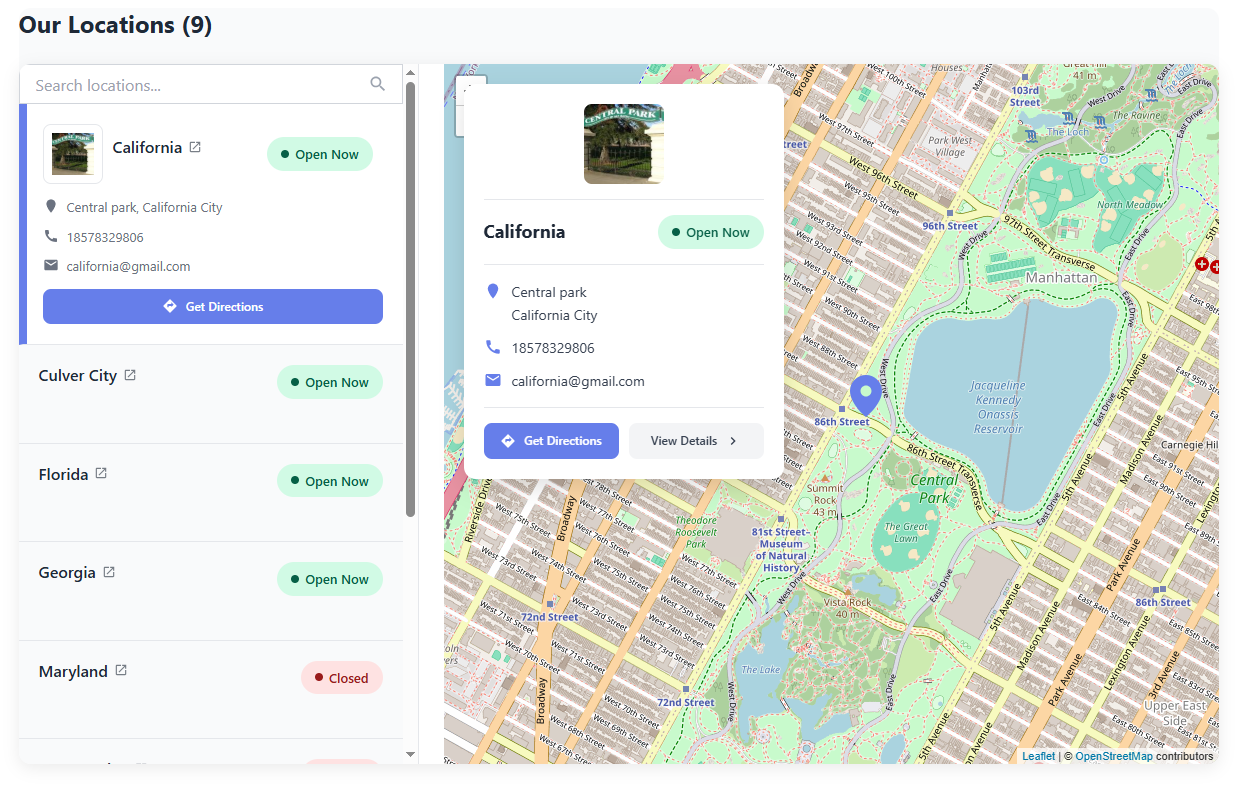
🗺️ Interactive Store Locator
- OpenStreetMap integration with dynamic store markers.
- Store information cards with directions and contact details.
- Filter stores based on product availability.
- Get directions to the nearest store location using direction links.
- Fully mobile-responsive store map interface.
- Shortcode for custom placement:
[mulopimfwc_location_info layout="tabs" search="yes"]
🏢 Business Operations Management
- Set operating hours per location with day-by-day scheduling.
- Define closed days and 24-hour/custom-hour schedules.
- Display real-time “Open” or “Closed” status dynamically.
- Restrict purchase actions when a selected location is closed.
- Show location-specific business hours on the store locator.
- Shortcode:
[mulopimfwc_location_status]
📦 Advanced Order Fulfillment
- Support cross-location shopping cart scenarios when enabled.
- Automatically group cart items based on store location.
- Split orders by location when compatible settings are enabled.
- Keep parent/child split order status synchronized.
- Preserve stock-reduction and restore behavior for split orders.
- Store package and order-item location metadata.
👥 Team Management
- Create location manager roles with permission control.
- Assign users to specific store locations.
- Restrict dashboard access per assigned location.
- Location-specific notifications and admin capabilities.
- Manager-specific frontend restrictions where enabled.
📊 Advanced Analytics & Reports
- Comprehensive reporting by location.
- Inventory, order, and revenue tracking per store.
- Low stock and product tracking.
- Visual charts for orders, revenue, investment, and profit.
- Customer location insights and recommendations.
- Export analytics data.
- Clear stored analytics data from admin tools.
🎯 Advanced Frontend Display
- Multi-level popup location selector.
- Cascading menu for hierarchical locations.
- Mobile-optimized popup interface.
- Shop/archive product sorting by location priority.
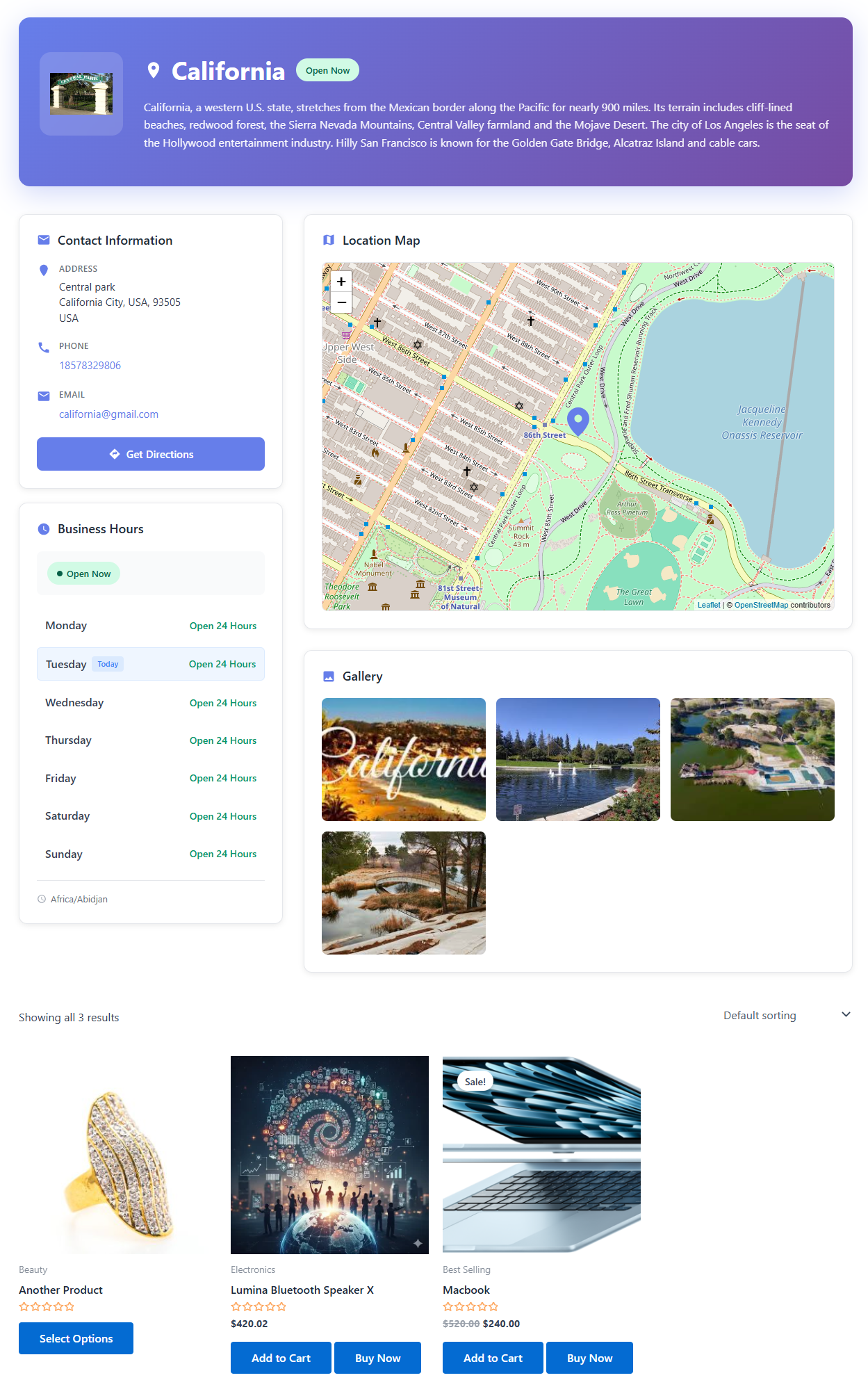
- Location information sections with maps, gallery, hours, contact data, and related products.
- Product blocks, widgets, related products, cross-sells, and upsells can respect location filtering when enabled.
- WooCommerce AJAX product search and REST product responses can respect selected-location context when enabled.
🔧 Advanced Technical Features
- REST API namespace:
mulopimfwc/v1. - Inventory bulk sync, single update, export, locations, products, webhook, and service-worker routes.
- API key and webhook secret management.
- Webhook logging option for inventory sync requests.
- Optimized SQL queries and caching paths.
- Page-cache compatibility helpers.
- Service-worker support through
/mulopimfwc-sw.jsand the REST fallback route. - Location resolver supports aliases, selected/current location contexts, request values, cookies, and native location archives.
- EDD and Envato release-channel support.
- Plugin license management and update system for EDD builds.
- Optional usage analytics in the EDD build when enabled by settings.
📥 Advanced Import & Export
- Export/import settings in JSON.
- Export/import inventory data with CSV.
- Full product and location migration using canonical CSV.
- ZIP package import workflow.
- Dry-run validation before applying imports.
- Chunked upload support.
- Background jobs with logs, artifacts, pause, resume, and cancel actions.
- REST inventory export supports JSON and CSV output.
🎬 How to Use Multi Location Product & Inventory Management for WooCommerce
💎 WHY CHOOSE THIS PLUGIN?
- Complete Multi-Location Management – Create unlimited business locations with hierarchical structure.
- Advanced Inventory Control – Track stock, prices, purchase cost, and backorders per location.
- Location-Based Pricing & Currency – Set regional pricing and currency strategies for market flexibility.
- Customer-Friendly Shopping – Frontend selector ensures users shop with the right location context.
- Centralized Order Dashboard – Manage and filter all orders by location easily.
- Data Export & Analytics – Track investments, revenue, stock, and performance visually.
- High Compatibility – Built with WooCommerce HPOS, REST API, and Checkout Blocks paths in mind.
🧰 USE CASES
- Retail Chains & Franchise Stores – Manage inventory per branch.
- Multi-Warehouse Businesses – Track and fulfill stock from the right warehouse.
- Regional Stores – Show prices and products by region or country.
- Click & Collect / BOPIS – Allow customers to buy online and pick up in store.
- Service-Based Businesses – Offer services by office or branch location.
- Restaurant Chains – Manage menus, prices, and inventory across branches.
- Pharmacies & Healthcare Providers – Track medicines and orders across facilities.
Third-Party Services
The plugin can contact third-party services depending on enabled settings and build channel:
🔹 Plugincy.com – Documentation/support/addons links, license activation/deactivation/status checks, update checks, and analytics/deactivation feedback endpoints in the build.
🔹 OpenStreetMap tile servers – Map tiles for location maps.
🔹 Nominatim/OpenStreetMap – Address search and reverse geocoding.
🔹 unpkg.com – Leaflet CSS/JS assets are currently enqueued from this CDN in the map screens.
🔹 ipapi.co – IP-based location lookup used by the selector popup scripts.
🔹 Google Maps – Optional directions links for latitude/longitude destinations.
🔹 open.er-api.com and floatrates.com – Currency exchange-rate lookup when rate sync is requested.
🔹 Slack, Microsoft Teams, Discord, Telegram, and custom webhook endpoints – Optional social notification delivery channels configured by the admin.
Review these services before enabling related features on production sites, especially if your store has privacy, consent, or regional data-transfer requirements.
Support
For support, feature requests or bug reports, please visit Plugincy Support.
Privacy Policy
To learn more about the data we collect and how we use it, please see our Privacy Policy.
Screenshots


Installation
Automatic Installation
- Go to Plugins Add New in WordPress admin.
- Search for “Multi Location Product & Inventory Management for WooCommerce”.
- Click Install Now and then Activate.
- Navigate to Location Manage in the admin menu to begin setup.
Manual Installation
- Download the plugin ZIP file.
- Upload via Plugins Add New Upload Plugin.
- Choose the ZIP and click Install Now, then Activate.
FTP Installation
- Upload the extracted plugin folder to
/wp-content/plugins/. - Go to Plugins Installed Plugins and activate it.
Configuration
Step-by-Step Setup
- Create Locations: Go to Location Manage Locations, add name, address, hours, contact info, and map data.
- Configure Settings: Adjust preferences in Location Manage Settings.
- Assign Products: Open any product, assign one or more locations in the location/stock controls.
- Manage Stock: Define stock, price, backorder, purchase cost, and status per location.
- Add Location Selector:
- Shortcode:
[mulopimfwc_store_location_selector] - PHP:
<?php echo do_shortcode('[mulopimfwc_store_location_selector]'); ?>
- Shortcode:
- Test Frontend: Visit shop, single product, cart, checkout, and order pages, select a location, and verify product, price, stock, cart, and order behavior.
Shortcodes
🔹 [mulopimfwc_store_location_selector] – General customer location selector.
Common attributes: title, show_title, show_button, use_select2, herichical, show_count, enable_user_locations, max_width, multi_line, class.
🔹 [mulopimfwc_display_popup] – Pro popup/modal trigger and output.
Common attributes: layout="default|modern|modern-simple|classic|tabs|compact|grid", on_click_button, button_title.
🔹 [mulopimfwc_location_selector] – Single-product location selector.
Common attributes: product_id, layout, label.
🔹 [mulopimfwc_location_info] – Location details, contact, map, hours, gallery, and related layouts.
Common attributes: id, slug, location, layout="auto|tabs|compact|grid", search, compact, limit, orderby, order.
🔹 [mulopimfwc_location_products] – Products for a selected location.
Common attributes: id, slug, location, columns, per_page, paginate, orderby, order, class.
🔹 [mulopimfwc_location_archive] – Location archive output for custom pages.
Common attributes: id, slug, location, show_info, show_products, show_filter, columns, per_page, paginate, orderby, order, class.
🔹 [mulopimfwc_product_filter] – AJAX product filter by location/stock when the current assignment mode allows it.
Common attributes: location="yes|no", stock="yes|no".
🔹 [mulopimfwc_location_recommendations] – Location-based recommendations.
Common attributes: limit, columns, title, show_title, orderby, show_badge.
🔹 [mulopimfwc_location_status] – Location open/closed/status badge.
Common attributes: id, slug, taxonomy, class; current and selected are supported location contexts.
REST API
The plugin registers the mulopimfwc/v1 namespace with these routes:
🔹 POST /inventory/bulk-sync
🔹 POST /inventory/update
🔹 GET /inventory/export
🔹 POST /webhook/inventory-update
🔹 GET /locations
🔹 GET /products
🔹 GET /sw.js
API requests use the configured API key or WordPress authentication. Webhook requests use the webhook secret or API key.
The API settings screen can generate and store API keys/webhook secrets, and optional webhook logging writes request logs under wp-content/uploads/ when enabled.
Compatibility Notes
🔹 WooCommerce is required. 🔹 HPOS-aware order queries are used for supported order-management screens. 🔹 Cash on pickup includes Checkout Blocks integration, but stores should test their active block/classic checkout flow before production use. 🔹 Mixed-location cart, location change in cart, split orders, and location-wise currency depend on compatible settings and may disable conflicting options. 🔹 Import/export workflows are CSV/JSON/ZIP based. Native XLS/XLSX inventory import was not found in this codebase. 🔹 Maps use OpenStreetMap/Leaflet. Native Google Maps map-provider and MaxMind integrations were not found. 🔹 POS/WMS/ERP sync is available through REST API and webhook endpoints, not through named vendor-specific native connectors.
FAQ
-
Can I create unlimited locations?
-
Yes! The plugin supports unlimited locations with no fixed location limit.
-
Can I set different prices per location?
-
Yes, location-specific regular prices, sale prices, purchase prices, and currency settings are supported.
-
Is this compatible with my existing WooCommerce setup?
-
It integrates with WooCommerce products, variations, cart, checkout, orders, HPOS-aware order queries, and several WooCommerce frontend/product query surfaces. You should still test your active theme, checkout setup, shipping methods, and payment gateways before production use.
-
Can I track inventory separately for each location?
-
Yes, each location’s stock can be managed independently in Stock Central and product-level location controls.
-
How do I manage multiple locations efficiently?
-
Use the centralized Stock Central Dashboard to search, filter, bulk assign, and edit products by location.
-
Can I export or import data?
-
Yes. Settings export/import uses JSON. Inventory workflows use CSV. The advanced import/export flow supports canonical CSV and ZIP package workflows.
-
Does it support automatic location detection?
-
Yes. The selector flow can use browser/IP location tools plus OpenStreetMap/Nominatim/Leaflet based location behavior. No native MaxMind implementation was found in this codebase.
-
Can I assign staff to specific locations?
-
Yes, the Location Managers system supports assigned locations and permission controls.
-
Does it support Google Maps?
-
No native Google Maps map-provider integration was found. The plugin uses OpenStreetMap/Leaflet for maps and can output Google Maps direction links.
-
Can POS, WMS, or ERP systems sync inventory?
-
Yes, through the REST API and webhook endpoints. This package does not include named vendor-specific POS connectors.
-
Where are the main plugin settings?
-
Use WordPress Admin Location Manage Settings. The settings page includes General, Inventory, Product Visibility, Popup, Order & Cart, Notifications, Location Wise Everything, User Experience, Location Info Management, Text Management, Advanced, and Plugin License tabs.
-
Can I customize plugin wording and labels?
-
Yes. The Text Management tools allow changing frontend/admin wording, applying translation defaults, and resetting text values.
-
Does import support XLS or XLSX files?
-
No native XLS/XLSX inventory import was found. Use the supported JSON settings export/import, CSV inventory workflows, canonical CSV, or ZIP package import workflow.
-
Does it support browser or PWA-style notifications?
-
Yes, optional admin notification features include floating/admin notices, local browser notifications through a service worker, test notifications, test emails, daily digest alerts, and site-status monitor alerts when configured.
Reviews


Contributors & Developers
“Multi Location Product & Inventory Management for WooCommerce” is open source software. The following people have contributed to this plugin.
Contributors

Translate “Multi Location Product & Inventory Management for WooCommerce” into your language.
Interested in development?
Browse the code, check out the SVN repository, or subscribe to the development log by RSS.
Changelog
1.1.0
- Added: pro-only Import/Export button UI scaffolding
- Added: pro-only Modern/Classic view switch UI scaffolding
- Added: Pro-only fields for each location:
- Currency
- Currency position
- Exchange rate
- Rate mode: Auto/Fixed
- Sync latest rate button
- Active/Inactive status
- Fixed: product Bulk edit related issues
- Changed: location-specific pricing is moved out of the free flow and marked as Pro-only
- Removed: unnecessary purchase quantity fields
- Changed: dashboard “Total Investment” was converted to a Pro-only blurred stat
1.0.9
- Fixed: syncSelectorStateFromCookie added for cache issue
1.0.8
- Fixed: issues with cache plugin
- Fixed: location based product visibility issue
- Improved: speed optimized
1.0.7
- Fixed: adjusted location manager and customer location insights files to reflect new version
- Fixed: modified settings to change default behavior for location switching
- Fixed: refined CSS styles for better layout and user experience
- Enhanced: location selector functionality with improved loading states and AJAX handling
- Improved: chart rendering logic to prevent overlapping values
1.0.6
- Added: location require
1.0.5
- Fixed: media upload related issues
1.0.4
- Fixed: validation related issues
- Fixed: condition added for relevant settings
- Fixed: style related issues
1.0.3
- Added: condition for relative settings
- Fixed: style related issues for location selector
1.0.2
- Added: Unlimited location creation and management
- Added: Location-based inventory tracking with Stock Central dashboard
- Added: Location-specific pricing (regular, sale, and purchase prices)
- Added: Frontend location selector with multiple display styles
- Added: Customer location selection with cookie persistence
- Added: Order location assignment and filtering
- Added: Product filtering and visibility controls by location
- Added: Import/Export settings and product data
- Added: Custom CSS support for styling
- Added: Shortcode support for flexible placement
- Added: WooCommerce HPOS compatibility
- Added: WooCommerce Blocks support
- Added: REST API filtering capabilities
- Added: Gross profit calculation per location
- Added: Hierarchical location support (parent-child relationships)
- Added: Location-wise product archive pages
- Added: Admin dashboard with comprehensive management tools
- Added: Geolocation and auto-detect customer location
- Added: Team management with location manager roles
- Added: Advanced analytics with visual charts
- Added: Export reports to CSV and Excel
- Added: Low stock products reporting
- Added: Revenue and investment tracking
- Added: Popup/modal location selector
- Added: Multi-level location selection
- Added: Product priority sorting
- Added: License management system
- Added: Custom taxonomy for location organization
- Added: Optimized database queries
- Added: Transient-based caching system
- Added: AJAX operations for dynamic features
- Added: Security hardening (nonce verification, sanitization)
- Added: Multilingual ready with text domain
1.0.1
- Added: location selection in single product
- Added: location cookie expiry management
- Added: location switching behaviour handling
- Update: UI improved
- Improvement: compatible with WordPress 6.8.2
1.0.0
- Initial release.