

سرجمیں
This plugin dramatically enhances the security of your WordPress website by adding Multi Factor Authentication (MFA) in the form of One Time Passwords (OTP)
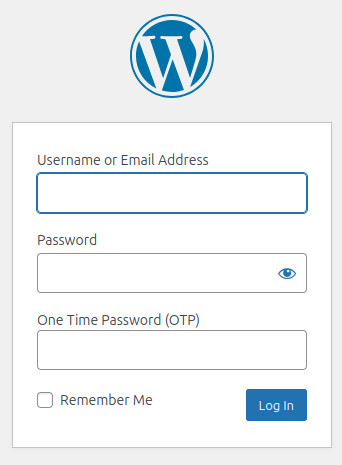
using Yubikey USB Tokens. In addition to providing your username and password to login, this plugin requests an OTP code
generated by a Yubikey, validates this via an API and only grants access if this check passes. The requirement to use an OTP can be set on a user by user
basis and there is also a feature to require users above a certain privilege level to always use OTP.
External services
This plugin connects to an API to validate the OTP tokens generated by your security key. This is required because storing the private keys
on the same web server as the site you wish to protect would be a security risk.
By default Yubico’s own validation server is employed, although you may setup your own server and use this instead
The default Yubico API only collects the one time password (OTP) data as provided by your security key when you login. The service validates this
and then stores this token as “used” so it may not be replayed as part of an attack. It does not collect any other data (such as what URL is being
authenticated using the key etc.)
This service is provided by “Yubico AB”: Privacy Policy, Terms of Use
اسکرین شاٹ
انسٹالیشن
- Buy a Yubikey if you do not already have one that supports OTP
- If you want to use Yubico’s cloud validation server, Create a Yubico ID & API Key
- Unzip plugin into your /wp-content/plugins/ directory.
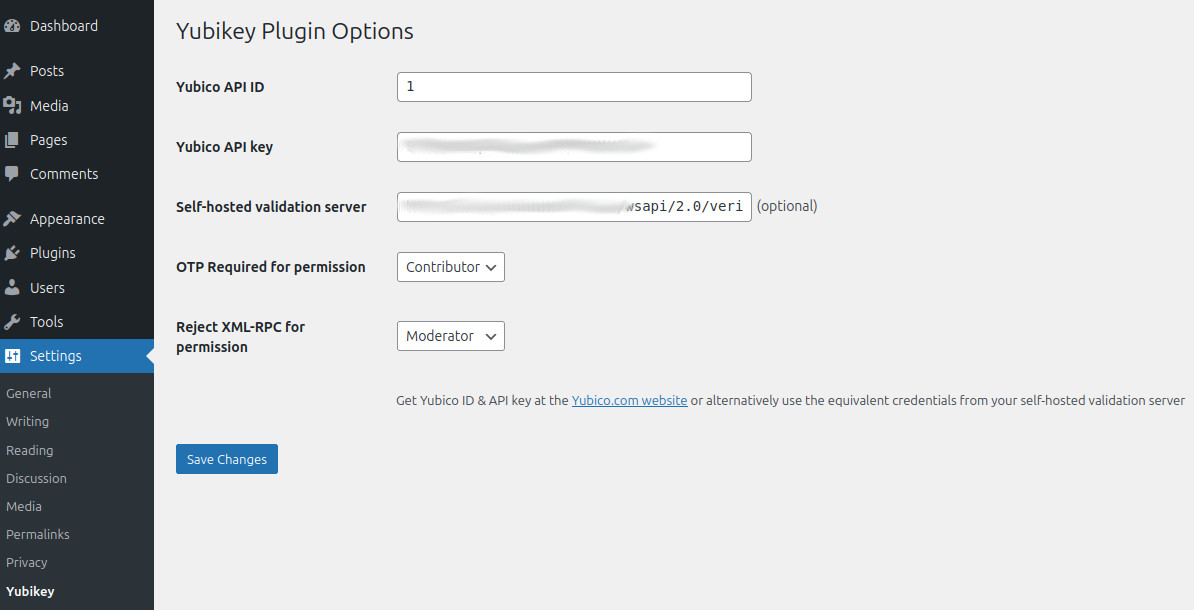
- Enter Yubico ID & API key on the Settings -> Yubikey options page
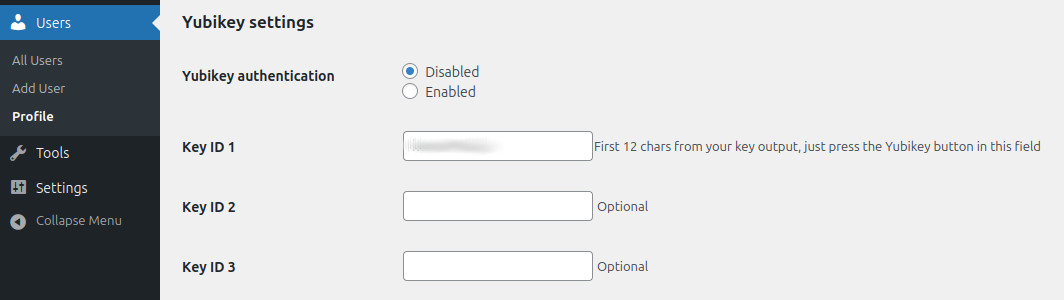
- Enter Key ID on the Users -> Profile and Personal options page. The Key ID is the first 12 characters produced when your Yubikey generates an OTP – these remain constant and are used to identify your key with the validation server
جُست ءُ پُرس
-
Where can I learn more about how Yubikey OTP works?
-
Please visit the Yubico OTP Webpage
-
How much does the Yubikey cost?
-
There are a variety of keys available, but the cheapest key that will work with the OTP model currently retails at $50. You can find
information on this key by visiting the associated Yubico Product Page -
Can I use my own validation server?
-
While setting up such a server is beyond the scope of this FAQ, yes you can. Simply put the URL of your validation server in
the “Private Validation Server API URL” field on the Settings -> Yubikey adin page. Remember to update the ID and API Key fields to a pair
that is supported by your server. -
Does the plugin force OTP use by all users?
-
No, unless you set the “Profile from which OTP is mandatory” setting, in which case users with this permission or above will need an OTP
to login. If you enable this feature it is critical that all users on your site who hold this permission profile or above have already setup
OTP in their profile, otherwise they will be locked out of the site! All other users will only require an OTP if they set one up in their
user profile. -
What is the “Allow XML-RPC login below profile” setting for?
-
When a user enables OTP in their profile, they will be unable to login to WordPress using the XML-RPC API (most commonly known as the method
by which the WordPress smartphone app accesses WordPress sites). If you enable this setting, users below this permission level will be allowed to
login via XML-RPC (the WordPress app) without use of an OTP (the app does not support use of OTP or supplemental login fields). -
I enabled OTP on my profile and now I’m locked out of the site, can I get back in?
-
Of course; just rename the yubikey plugin directory in wp-content/plugins/ and the plugin will automatically be disbaled. With the plugin disabled
you will be able to login with just your plain username and password.
جائزہ

کمک کنوک & دیمروئی کنوک
“Yubikey” اوپن سورس سافٹ ویئر اِنت۔ اے پلگ ان ءِ تہا رند ءِ مردماں وتی کرد پیلو کتگ۔
کمک کار

“Yubikey” ءَ وتی زبان ءَ رجانک کن اِت۔
دیمروئی ءِ تہا دلچسپی داریت؟
کڈ ءَ براؤز کن اِت، SVN ءِ ذخیرہ ءَ بچار اِت، یا دیمروئی ءِ لاگ ءَ RSS ءِ وسیلہ ءَ سبسکرائب بہ کن اِت۔
چینج لاگ
1.0.1
- Added restriction so plugin file cannot be accessed directly
- Added a description in the readme file that explains the use of the external Yubico validation service
1.0
- Forked from “yubikey-plugin” by Henrik Schack
- Updated Yubikey API support to version 2.0
** Inclusion of nonce field
** Upgrading to HTTPS
** Enabled support for hash validation of the request as well as the response for greater security - Added support for self-hosted validation server
- Configurable “minimum permission” that can bypass use of OTP, for example, if you’re an admin you must use OTP, a subscriber need not
- Optional restriction on ability of users above a certain access level from accessing the XML-RPC API
- Ensure that OTP requirement is bypassed when logging in via the XML-RPC API
- POT file updated with changed language strings (bundled translations from fork remain but will require updating)
- Ensured plugin passes all requirements of the WordPress Plugin Check (PCP)