
سرجمیں
PukiWiki is a PHP-based Wiki. PukiWiki features headings, quotations, lists of various types, preformatted texts, images, footnotes, hyperlinks, smileys, and many others.
WP PukiWiki allow the WordPress author to use PukiWiki-style Wiki syntax in writing posts and pages. The screenshots give you some idea. Visit the main site for more information.
Requirements
- Working PukiWiki system accessible from the Internet.
- WP PukiWiki: WP PukiWiki uses PHP’s Curl API. Turn it on if this feature is missing on your site.
اسکرین شاٹ
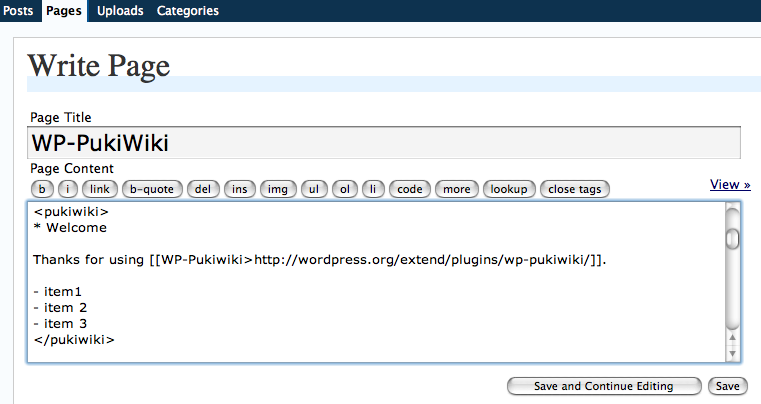

انسٹالیشن
- Setup
PukiWikiand make it accessible via http from your WordPress hosting server.PukiWikican be obtained from PukiWiki official site. If you already have a runningPukiWikiyou can use that site. WP PukiWiki uses a PukiWiki system to translate Wiki syntax to HTML but WP PukiWiki does not modify PukiWiki at all. Therefore, it is safe to use your existing PukiWiki system. - Obtain and unzip wp-pukiwiki.zip.
- Open
wp-pukiwiki.phpwith a text editor and modify the definition forWPPW_URLso that it points to the URL of yourPukiWikisite. - Upload the
wp-pukiwikifolder/directory to the/wp-content/plugins/directory of your WordPress hosting server. - Activate the plugin.
جُست ءُ پُرس
You can find more information from the WP PukiWiki main site. It offers more detailed installation instructions, examples, manual, and more.
جائزہ
اے پلگ ان ئے ہچ جائزہ نیستیں
کمک کنوک & دیمروئی کنوک
“WP PukiWiki” اوپن سورس سافٹ ویئر اِنت۔ اے پلگ ان ءِ تہا رند ءِ مردماں وتی کرد پیلو کتگ۔
کمک کار
“WP PukiWiki” ءَ وتی زبان ءَ رجانک کن اِت۔
دیمروئی ءِ تہا دلچسپی داریت؟
کڈ ءَ براؤز کن اِت، SVN ءِ ذخیرہ ءَ بچار اِت، یا دیمروئی ءِ لاگ ءَ RSS ءِ وسیلہ ءَ سبسکرائب بہ کن اِت۔