
سرجمیں
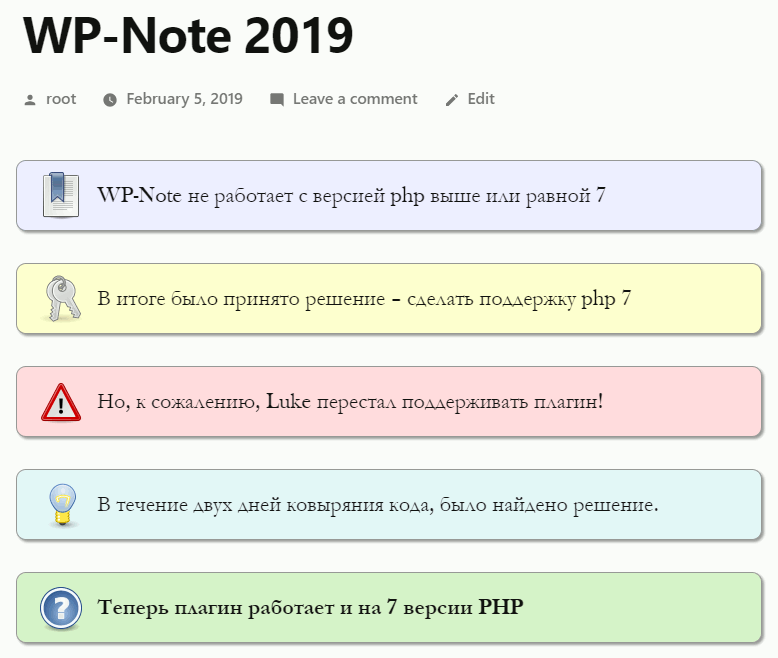
Beautiful design of notes in posts. The plugin fully supports the old version of the WP-Note plugin from Luke.
اسکرین شاٹ
انسٹالیشن
- Extract the contents of the archive
- Upload the contents of the wp-note-2019 folder to your \’wp-content/plugins\’ folder
- Log in to your WordPress admin and got to the \’Plugins\’ section. You should now see WP-Note-2019 in the list of available plugins
- Activate the plugin by clicking the \’activate\’ link
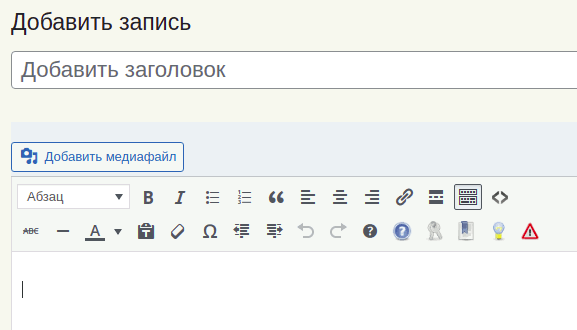
- Now you add quicktags such as note, important, tip, warning, help in your post.
جائزہ

مارچ 31, 2019
The plugin is compatible with the old wp-note and works on php 7.2
Thank.
Плагин совместим со старым wp-note и работает на php 7.2
Спасибо.
کمک کنوک & دیمروئی کنوک
“WP-Note 2019” اوپن سورس سافٹ ویئر اِنت۔ اے پلگ ان ءِ تہا رند ءِ مردماں وتی کرد پیلو کتگ۔
کمک کار
“WP-Note 2019” ءِ رجانک ءِ رد ءَ 1 ءِ دمگاں رجانک کنگ بوتگ۔ چہ رجانکاراں منت واراں کہ آہاں وتی کرد پیلو کتگ۔
“WP-Note 2019” ءَ وتی زبان ءَ رجانک کن اِت۔
دیمروئی ءِ تہا دلچسپی داریت؟
کڈ ءَ براؤز کن اِت، SVN ءِ ذخیرہ ءَ بچار اِت، یا دیمروئی ءِ لاگ ءَ RSS ءِ وسیلہ ءَ سبسکرائب بہ کن اِت۔
چینج لاگ
1.2
- Tested up 5.9 version
- Added buttons to the editor panel Classic Editor
1.1.1
- Tested up 5.5 version
- Remove file – css-test.html
- Change css style – change right alignment, value = -6px
1.1
- Bug fixed – Warning: call_user_func_array(). The error did not appear for all users.
1.0
- Initial release.