
سرجمیں
Insert quotes and pull them randomly into your pages and posts (via shortcodes) or your template (via template tags).
Can refer to quote IDs to use specific quotes. Also widget-enabled
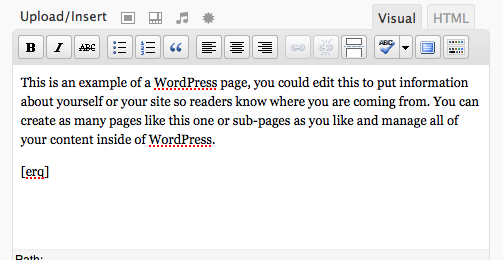
اسکرین شاٹ


انسٹالیشن
- Upload the contents of the zip file to the your plugins directory (default:
/wp-content/plugins/) - Activate the plugin through the ‘Plugins’ menu in WordPress
- Go to the Easy Random Quotes page under Settings
- Add/edit the quotes you’d like to use on your site
- To display in a page or post, use the short code: [erq], or [erq id={id}] if you’d like to use only a specific quote
- To add to your template, use the template tag:
<?php echo erq_shortcode(); ?>, or<?php echo erq_shortcode(array('id' => '{id}')); ?>if you’d like to use only a specific quote
جائزہ
اے پلگ ان ئے ہچ جائزہ نیستیں
کمک کنوک & دیمروئی کنوک
“Easy Random Quotes” اوپن سورس سافٹ ویئر اِنت۔ اے پلگ ان ءِ تہا رند ءِ مردماں وتی کرد پیلو کتگ۔
کمک کار
“Easy Random Quotes” ءَ وتی زبان ءَ رجانک کن اِت۔
دیمروئی ءِ تہا دلچسپی داریت؟
کڈ ءَ براؤز کن اِت، SVN ءِ ذخیرہ ءَ بچار اِت، یا دیمروئی ءِ لاگ ءَ RSS ءِ وسیلہ ءَ سبسکرائب بہ کن اِت۔
چینج لاگ
1.8
- maintenance
1.7
- New: Random quotes from a given list of ids: [erq id=’2,4,6′]
- General cleanup
1.6
- adds import option
1.5
- fixed issue where widget would try to display non-existant (deleted) quotes
- general updating, code cleaning
- utilizes contextual help in WordPress
1.4
- added reset button to delete all quotes without uninstalling
- added title option in widget
- ready for localization
1.3
- fixed data storage/retrieval issue
1.2
- Actually fixed php error when saving data – seriously, if you’ll tell me it’s broken, I can fix it faster and I won’t look like an idiot for so long…
1.1
- Fixed php error when saving data
1.0
- Initial Release